
Founders ask us the same thing again and again: “Should I build my store on WordPress or Shopify?” Usually they’ve already read five articles, and every one of them ends with “it depends on your needs”. True, but not much help when you have to pick one this week.
We build on both, so we have no reason to push you either way. This guide compares WordPress (with WooCommerce) and Shopify on the things that actually decide how your store runs: monthly costs, fees, ease of use, SEO, design freedom and how each one copes as you grow. At the end there’s a simple way to decide.
The short version
- Choose Shopify if you want to start selling quickly, you don’t want to manage hosting, security or updates, and you’re happy paying a monthly fee for that convenience.
- Choose WordPress + WooCommerce if content and SEO matter a lot to you, you want full control over the site and your data, or you need custom features that Shopify apps make expensive.
Both are good platforms. Most problems we see come from picking one for the wrong reasons, not from the platform itself.
What are you actually comparing?
WordPress is a content management system that runs about 43% of all websites. On its own it isn’t a store. You add WooCommerce, a free plugin, to turn it into one. You host it yourself (or with a managed WordPress host), and you own everything.
Shopify is a hosted e-commerce platform. You pay a monthly subscription and Shopify handles hosting, security, checkout and updates. You customise it with themes and apps from the Shopify App Store.
That difference, self-hosted vs hosted, explains almost every pro and con below.
Cost: monthly fees, transaction fees and apps
This is where most comparisons get vague, so here are real numbers for Indian stores.
Shopify costs
Shopify charges a monthly plan fee. In India, the Basic plan works out to roughly ₹2,400 a month on annual billing and around ₹3,200 on monthly billing. The prices move with the dollar exchange rate, so always check your own dashboard. Higher plans cost more each month but lower the Shopify transaction fee.
Two things catch Indian merchants off guard:
- Shopify Payments isn’t available in India. You’ll use a gateway such as Razorpay, PayU, Cashfree or CCAvenue, which charge around 1.75–2% plus GST per transaction.
- Shopify adds its own transaction fee when you use a third-party gateway, around 2% on Basic, dropping on higher plans.
Then there are apps. Reviews, subscriptions, upsells, wishlists and advanced filters are often paid apps at $5–$30 each per month. A typical growing store can spend ₹3,000–₹15,000 a month on apps alone.
WordPress + WooCommerce costs
WooCommerce itself is free. You pay for:
- Hosting: about ₹3,000–₹30,000 a year depending on traffic (good hosting matters, don’t go for the cheapest)
- A premium theme: roughly ₹4,000–₹8,000 once, or a yearly licence
- Paid plugins for things like subscriptions or advanced shipping
- Maintenance: updates, backups and security, either your time or a maintenance plan
There’s no platform transaction fee. You only pay your payment gateway’s fee.
So which is cheaper?
For a small store with modest sales, the yearly running costs are often similar. As sales grow, WooCommerce usually becomes cheaper because there’s no percentage going to the platform. Shopify’s extra cost buys you convenience: no server, no security patching, no “the site broke after an update” mornings.
If you’re still working out your overall budget, our guide on how much a website costs in India covers build costs and yearly fees in detail.
A worked example: 300 orders a month
Say you sell 300 orders a month at an average of ₹1,200, so ₹3,60,000 in sales. Here’s a rough monthly running cost on each platform, using the fee levels above. Treat it as an illustration, and plug in your own numbers.
| Monthly cost | Shopify (Basic) | WooCommerce |
|---|---|---|
| Platform plan | ₹2,410 | – |
| Shopify transaction fee (2%) | ₹7,200 | – |
| Payment gateway (2%) | ₹7,200 | ₹7,200 |
| GST on gateway fee (18%) | ₹1,296 | ₹1,296 |
| Apps / paid plugins | ₹4,000 | ₹1,000 |
| Hosting | Included | ₹1,500 |
| Maintenance and updates | Included | ₹5,000 |
| Total | ≈ ₹22,100 | ≈ ₹16,000 |
That’s a difference of about ₹6,100 a month, or roughly ₹73,000 a year, in WooCommerce’s favour at this volume. The gap grows as sales grow, because Shopify’s transaction fee is a percentage. On the other hand, the Shopify column includes hosting, security and maintenance you never have to think about. Whether that convenience is worth ₹6,000 a month depends on your team.
Ease of use
Shopify is easier. You can sign up, choose a theme, add products and take your first order in a weekend. The admin is clean, the mobile app is good, and you never touch a server.
WordPress has a learning curve. The dashboard does more, which means there’s more to learn, and you (or your developer) are responsible for updates. Once it’s set up properly, editing products and pages is easy, especially with a builder like Elementor. But the first setup is where people get stuck.
If nobody on your team is technical and you don’t want to pay for ongoing support, Shopify will be less stressful.
SEO and content
This is WordPress’s strongest card.
WordPress was built for publishing. Blogs, guides, landing pages and category pages are all first-class content, and plugins like Rank Math or Yoast give you full control over titles, schema, redirects and sitemaps. If your growth plan depends on ranking for informational searches (“best running shoes for flat feet”, “how to choose a mattress”), WordPress makes that much easier.
Shopify’s SEO is solid for product and collection pages. It handles sitemaps, canonical tags and basic schema out of the box. Where it’s weaker:
- URL structure is fixed (
/products/and/collections/prefixes you can’t remove) - The built-in blog is basic compared with WordPress
- Some advanced SEO features need paid apps
Neither platform will rank you on its own. Content, site speed and links still do the heavy lifting. If organic traffic is your main channel, though, WordPress gives you more room. Our technical SEO checklist works for both platforms.
Design freedom and customisation
With WordPress, you can build almost anything. Custom product pages, unusual checkout flows, B2B pricing, marketplaces, bookings plus products on the same site. If you can describe it, a developer can build it.
With Shopify, you work inside Shopify’s structure. Themes are excellent and the Online Store 2.0 editor is flexible, but deeper changes (especially to checkout) are limited unless you’re on Shopify Plus. You’ll often reach for an app instead of custom code, which is quick but adds monthly costs and can slow the store down if you pile them up.
Speed, security and maintenance
Shopify handles hosting, SSL, security and uptime for you. That’s a big deal for small teams. Performance is generally good, as long as you don’t install 25 apps.
WordPress performance depends on your hosting, theme and plugins. Built well, it’s fast. Built badly, it’s painfully slow. Security is your responsibility: updates, backups, a firewall and strong logins. None of this is hard, but someone has to own it every month. Our WordPress development service includes maintenance plans for exactly this reason.
Scaling as you grow
Both platforms run very large stores. Shopify scales effortlessly on traffic, and big sale days are rarely a problem because the infrastructure is Shopify’s job. When you outgrow apps and themes, Shopify Plus opens up checkout customisation and automation, at a much higher price.
WooCommerce scales well too, but you need hosting that can handle the load and a developer who knows how to optimise database queries, caching and search. Done right, it handles thousands of products and orders without trouble.
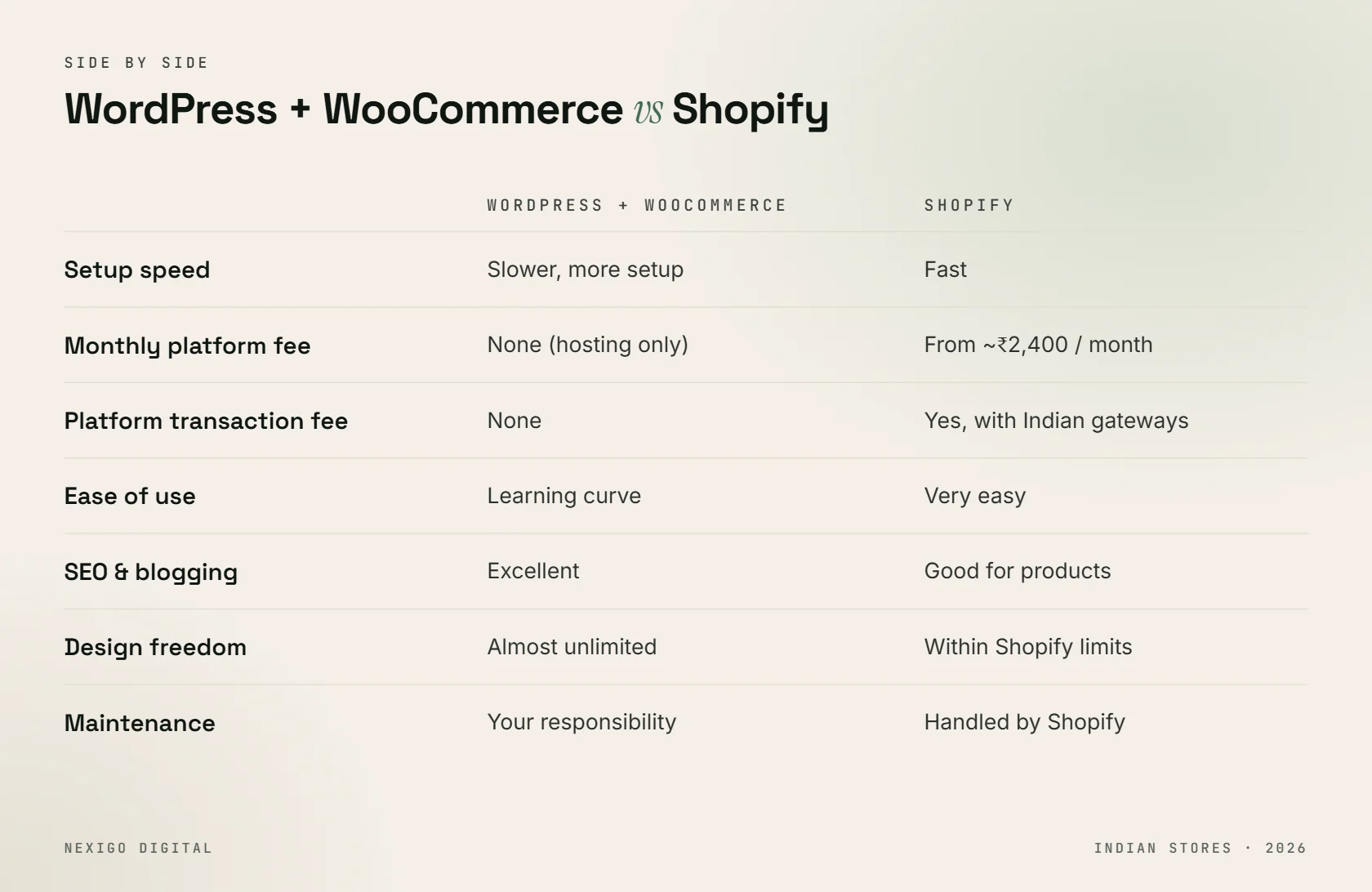
Side-by-side comparison
| WordPress + WooCommerce | Shopify | |
|---|---|---|
| Setup speed | Slower, more setup | Fast |
| Monthly platform fee | None (hosting only) | Yes, from roughly ₹2,400/month |
| Platform transaction fee | None | Yes with third-party gateways in India |
| Ease of use | Learning curve | Very easy |
| SEO and blogging | Excellent | Good for products, basic blog |
| Design freedom | Almost unlimited | Flexible within Shopify’s limits |
| Maintenance | Your responsibility | Handled by Shopify |
| Best for | Content-led brands, custom needs, B2B | Fast launches, D2C brands, small teams |
How to decide: five questions
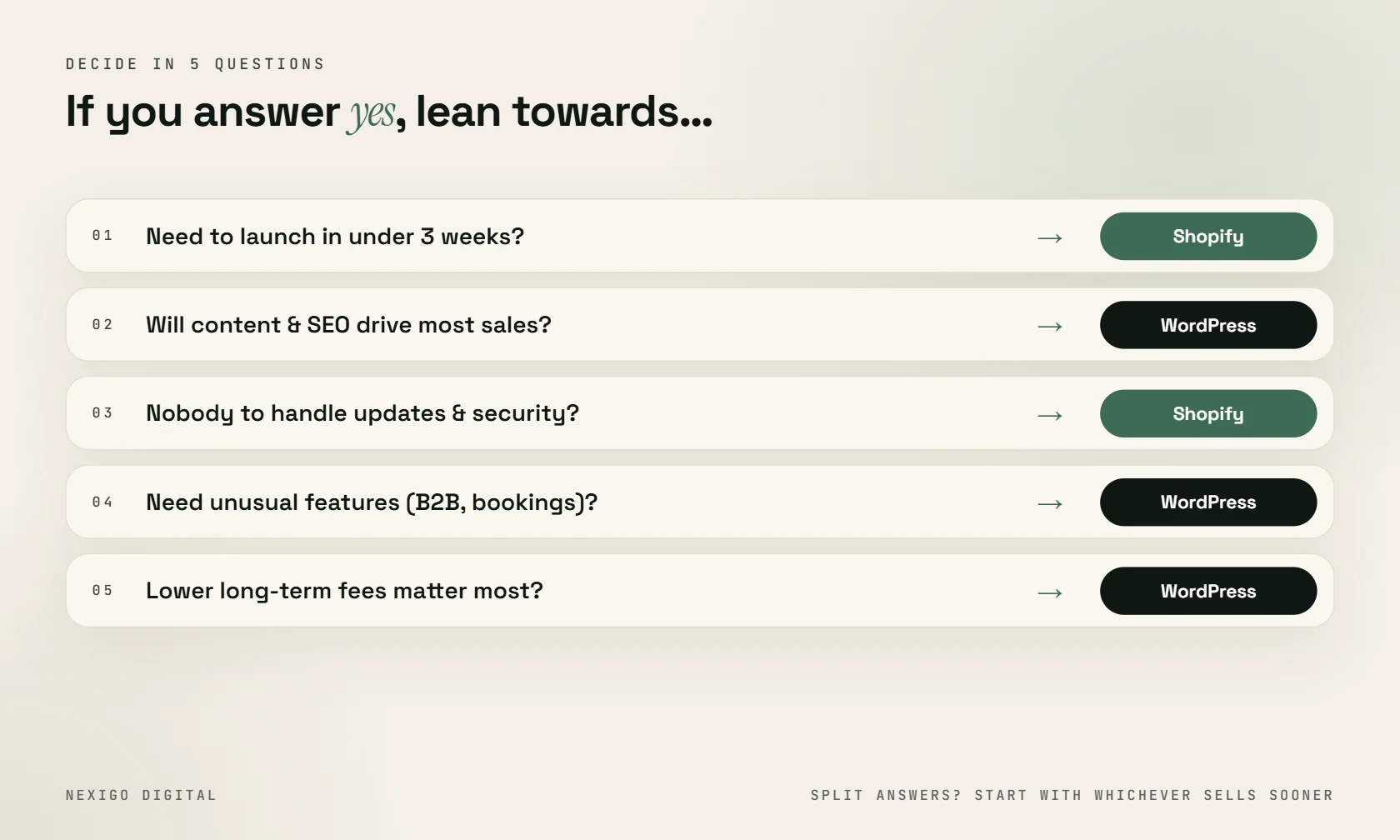
Answer these honestly and the choice usually becomes obvious.
- Do you need to launch in under three weeks? Lean Shopify.
- Will content and SEO drive most of your sales? Lean WordPress.
- Is there anyone on your team, or a partner, to handle updates and security? If not, lean Shopify.
- Do you need unusual features (B2B pricing, bookings, custom checkout)? Lean WordPress.
- Do you care more about lower long-term fees or less hassle? Lower fees: WordPress. Less hassle: Shopify.
If your answers split down the middle, start with whichever lets you sell sooner. You can migrate later. Stores move between platforms all the time, and with proper redirects you keep your rankings.
What we usually recommend
For D2C brands selling a focused range of products, especially fashion, beauty and lifestyle, we usually recommend Shopify. It’s quick to launch, reliable on sale days, and the team can manage it without a developer on call.
For brands where content does the selling (education, health, B2B, anything with long buying decisions), or where the store needs custom logic, we usually recommend WordPress with WooCommerce.
Not sure which camp you’re in? Our e-commerce website development team can look at your products, budget and growth plans and give you a straight recommendation, even if that means telling you the cheaper option is the right one. Book a free call and bring your questions.
Frequently asked questions
Is WordPress or Shopify better for SEO?
WordPress gives you more SEO control, especially for blogs, landing pages and URL structure. Shopify handles product SEO well out of the box but has fixed URL prefixes and a basic blog. For content-led growth, WordPress usually wins.
Is Shopify cheaper than WooCommerce in India?
Not usually in the long run. Shopify charges a monthly plan fee, plus a transaction fee when you use Indian payment gateways like Razorpay, plus app subscriptions. WooCommerce has no platform fees, but you pay for hosting and maintenance.
Can I move from Shopify to WordPress later, or the other way?
Yes. Products, customers and orders can be migrated between Shopify and WooCommerce. The important part is setting up 301 redirects from old URLs to new ones so you don’t lose search rankings.
Which is easier for beginners?
Shopify is easier for beginners. You don’t manage hosting, security or updates, and the admin is simple. WordPress takes longer to learn but gives you more control once it’s set up.
Does Shopify Payments work in India?
No. Shopify Payments isn’t available in India, so Indian stores use third-party gateways such as Razorpay, PayU, Cashfree or CCAvenue, which charge their own per-transaction fee.
Need help with this?
Get a website that brings enquiries, not just visitors.
Send me your current website or idea on WhatsApp. I'll reply personally with honest advice and a clear quote.

Written by
Sourabh Kumar Pandit
I have been building websites and running SEO and ad campaigns for Indian businesses since 2019, with 200+ projects for 180+ clients from Delhi and Patna. I write these guides from what actually works on real client projects.